ALEKS Math Placement
What is ALEKS PPL?
ALEKS PPL is an online assessment and learning system that offers math placement exams and individualized review to assist in accurate placement. Studying with ALEKS and retaking the assessment will allow you to improve your placement score and take the most appropriate class for your success.
How does it work?
An access fee of $20.00* will give you 12 months of access to 1 practice assessment, 4 placement assessment attempts, and ALEKS-generated learning modules for personalized math review.
*If unable to pay online, the Cashiers can take cash or check for $20.00.
What do I need to do?
Instructions outlined are for Shoreline students. If you are not a Shoreline student, contact the testing center for the steps to take to take a Math Placement exam.
- Go to the ALEKS website and click “Sign up Now!”
- Input Shoreline's course code: MPGA9-TDFCH
- Confirm your class information Math Placement, Academic Year 2026-2027.
- Select “I have never used ALEKS before”.
- Fill out your information.
- NOTE: ALEKS will ask you to verify the email you are signing up with. Please ensure to sign up with an email that you have direct access to so that you may verify your account. This email does not have to be your student email. If you do plan to use your Shoreline email, ensure that you have used the email and it is accessible to you.
- Purchase an access code when prompted by using a credit or debit card.
- Paying with cash: Cashiers on campus in Building 5000 will assist you in paying for ALEKS. After cash payment, bring the receipt down to the Testing Center Office in Room 5100 to receive your access code.
- Fill out the Student Registration Information. Be sure that your student ID number and school email are correct for accurate score reporting.
- When registration is complete, you will be sent an email with your username and password.
- Go to the ALEKS website and log in with your username and password.
- The first time you login, you will see an animated introduction as well as a Tutorial to acquaint you with the system.
The first attempt is the practice assessment, designed to prepare you to find the right level of math class for you.
- You can take this first practice assessment from any web-enabled computer, and you do not need anyone monitoring while you do it.
- The first placement assessment is entirely for your benefit. The score will not count for placement into a course at Shoreline College.
- The ALEKS system will use this test to develop your learning module to help you study before your first official placement assessment.
- The assessment will have at most 25 questions and is timed at 3 hours. Generally, it takes approximately 1 to 1.5 hours to complete.
- Although you are taking this practice test on your own, we suggest you follow the
same rules that will apply to your official placement test:
- No calculator is allowed except when provided on-screen by ALEKS.
- No outside resources other than writing utensils and scratch paper are allowed.
To take the practice assessment, click “Get Started” when you access ALEKS.
After each assessment, your score (a single number between 0 and 100) will display on your screen as soon as you are finished. The table below shows the math course placement for each ALEKS score.
| ALEKS Score | Places you into: |
|---|---|
| 0-13 | ABE Math Foundations |
| 14-19 | ABE Math Transitions |
| 20-38 | Math 99 with support / Math 107 with support / Math 146* with support |
| 39-45 | Math 141 with support / Math 99 / Math 107 / Math 146* |
| 46-60 | MATH 111/141 |
| 61-79 | MATH 142/148 |
| 80-100 | MATH 151 |
*Note: MATH& 146 has an English prerequisite. For placement above MATH 151, contact mathadvising@shoreline.edu. Want to improve your placement? Then the two-credit MATH 7 course might just be the class for you.
After you complete the practice assessment, ALEKS will use the results of your assessment attempts to identify areas for review and create an individualized learning module for you.
Using the learning module is optional.
Note that the topics in the prep module span over a wide range of math courses. You do not need to master all the topics to retake the placement assessment. Even just a few hours in the Prep and Learning Module can yield a higher course placement.
To access your Prep and Learning Module after an assessment, click on “Get Started,” and then click “Start My Path” or "Continue My Path".
In-Person Placement Assessment
Shoreline’s Testing Center will proctor your assessment for free. No appointment necessary, Monday - Thursday at 9:00 am OR 2:00 pm. Room 5100, first floor of the 5000 Building next to Safety & Security. Scores are uploaded to your student record as soon as you finish in-person.
- Bring a physical photo ID to your appointment, either a SC ID, drivers license, or passport.
- If you will be driving, park in the Visitors Lot and come to the Testing Center for a FREE parking permit.
- The assessment will have at most 25 questions and generally takes approximately 1 -2 hours to complete.
- No calculator is allowed except when provided on-screen by ALEKS.
- No outside resources other than a writing utensil and scratch paper are allowed.
- Placement assessment scores are valid for 2 years at Shoreline College.
Online Placement Assessment
Online proctored assessments must be taken with Respondus Monitor. You are permitted scratch paper and writing utensils for your exam and you will need a photo ID to present to the camera.
Please review the Respondus Monitor video guide provided by McGraw Hill or the text instructions.
To use Respondus Monitor to proctor your ALEKS Placement Assessment:
- When beginning your Proctored Placement, select ‘Launch Lockdown Browser + Webcam’ to initiate the process
- You will be asked the following:
- Agree to Terms of Use
- Microphone + Camera permissions
- Use of your phone as a secondary camera
- Present your ID to your camera
- Show the surrounding area and your workspace to ensure you have no electronics
- Instructions on allotted materials
- Good luck!
Scores will need to be manually reviewed and entered by staff, your score will be entered into your student record within one full business day of completion- check your inbox for our correspondence. If there were any issues with your placement attempt, we will reach out.
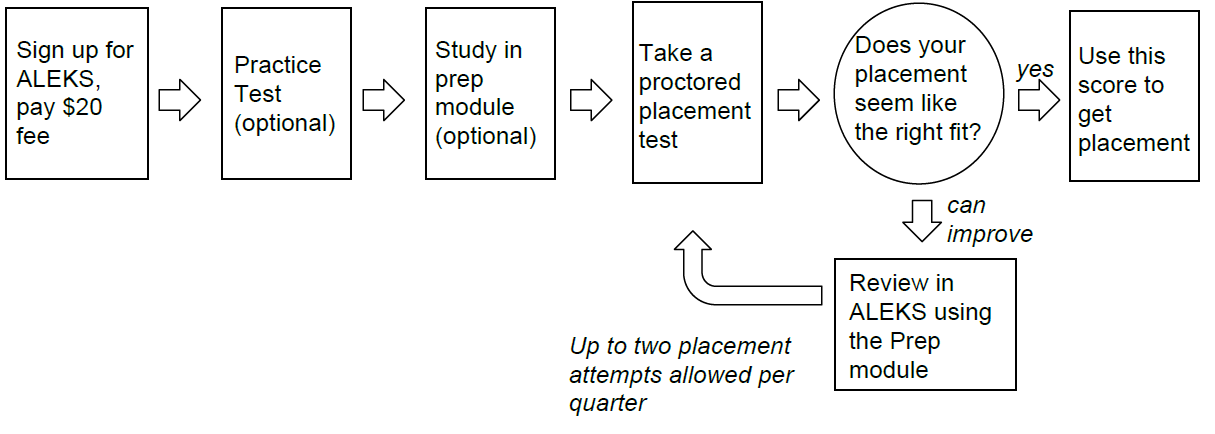
- In addition to your optional practice assessment, you will have four total attempts at placement assessment.
- Between each placement assessment attempt, you will be required to complete 3 hours of studying using the prep modules prepared by ALEKS.
- You may take the ALEKS assessment for placement up to twice per quarter (not including the placement assessment).
Below is a visual summary of the steps for math placement using ALEKS